Question: How can users authenticate with either their Google email or their Microsoft/Outlook email when the addresses have different domains but represent the same person?
Answer: Create two user records—one for each email address—and connect both records to the same business record using the same FMBId. Users can then use either login method while remaining associated with the same business identity.
Thread Attachments
Original Slack Thread
User U09UK5V4VHB: It shows Enabled in the UI, but the AI reports it is "False"
User UBBJX2EHM: hmm that seems odd, would have to try and reporoduce
User U09UK5V4VHB: Any updates?
User UBBJX2EHM: I would go by what the UI says. The reason for this is we have many people who use oath and have not reported this as an issue as of yet.

That doesn’t mean it’s not an issue, but we definitely know that the UI is correct
User UBBJX2EHM: Follow up: the MCP can not in fact read app settings (Oauth) and there are separate settings for overirdes in the env for auth also

Go by App Settings → Authentication → Enable 3rd Party Authentication. If that switch is on, OAuth is on. The MCP assistant cannot read that setting, and env-level `oauthEnabled` being false usually just means “inherit from the app,” not that OAuth is off.
User U09UK5V4VHB: Do you know why we're getting a 406
User UBBJX2EHM: let me check that error
User UBBJX2EHM: *Check*
1. App Settings → Authentication → the specific provider (not just the master switch).
2. The 406 JSON `message` — it names the missing provider.
They are starting login with a provider that actually has credentials saved.
User U09UK5V4VHB: Has credentials. User ID and secret
User UBBJX2EHM: ignroe the beta bot,
make sure if oyu ahve env level auth it should be off else needs creds too
User U09UK5V4VHB: Can it be that we use <http://www.elevation-ed.com|www.elevation-ed.com> as our Google Domain and not the <http://www.axiom-board.com|www.axiom-board.com>? Or does that matter?
User UBBJX2EHM: <@U091LT54RT9> can you kill this untill ready pelase
User U09UK5V4VHB: I disabled the 3rd party authentication and the Google button is still stuck
User UBBJX2EHM: can you explain stuck more?
User U09UK5V4VHB: I still see the Continue with Google button. Do we control that on the page? Or is it automatic.
User UBBJX2EHM: that is from your auth provider, it sounds like. but can you post screens
User U09UK5V4VHB: I am now getting something different.
User U09UK5V4VHB: Back to 409
User UBBJX2EHM: It says behind there that the client was not found. Have you set up the app with Google?
User U09UK5V4VHB: Yes
User UBBJX2EHM: I that is coming from Google so u think issue is there
User U09UK5V4VHB: does google have to control the domain we are using to log in?
our Google domain is <http://elevation-ed.com|elevation-ed.com>
we are using <http://axiom-dashboard.com|axiom-dashboard.com> in Klai?
User UBBJX2EHM: yes domains must match
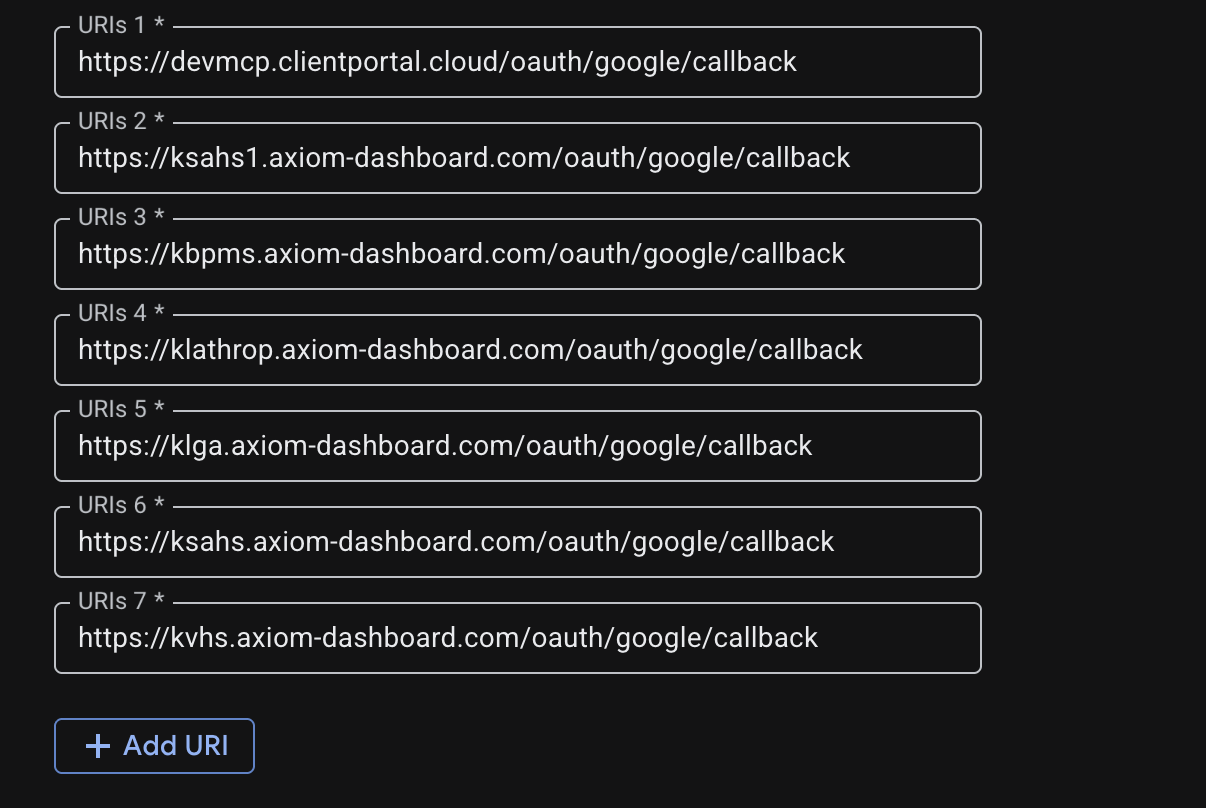
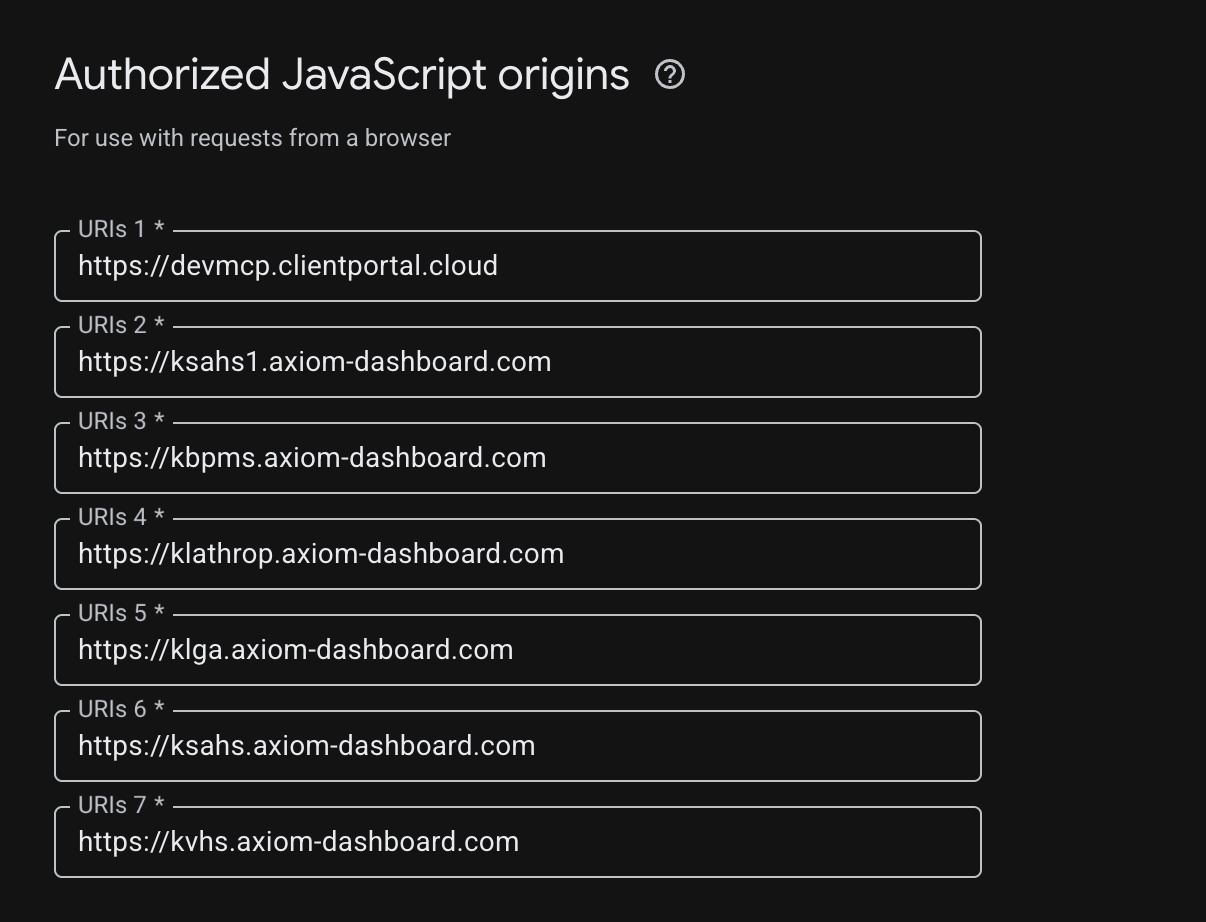
User U09UK5V4VHB: These are the call back uri's listed
User U09UK5V4VHB: So we would need to change the domains in Klai?
User UBBJX2EHM: i dont see urls there
User U09UK5V4VHB:
User U09UK5V4VHB: Do those look correct?
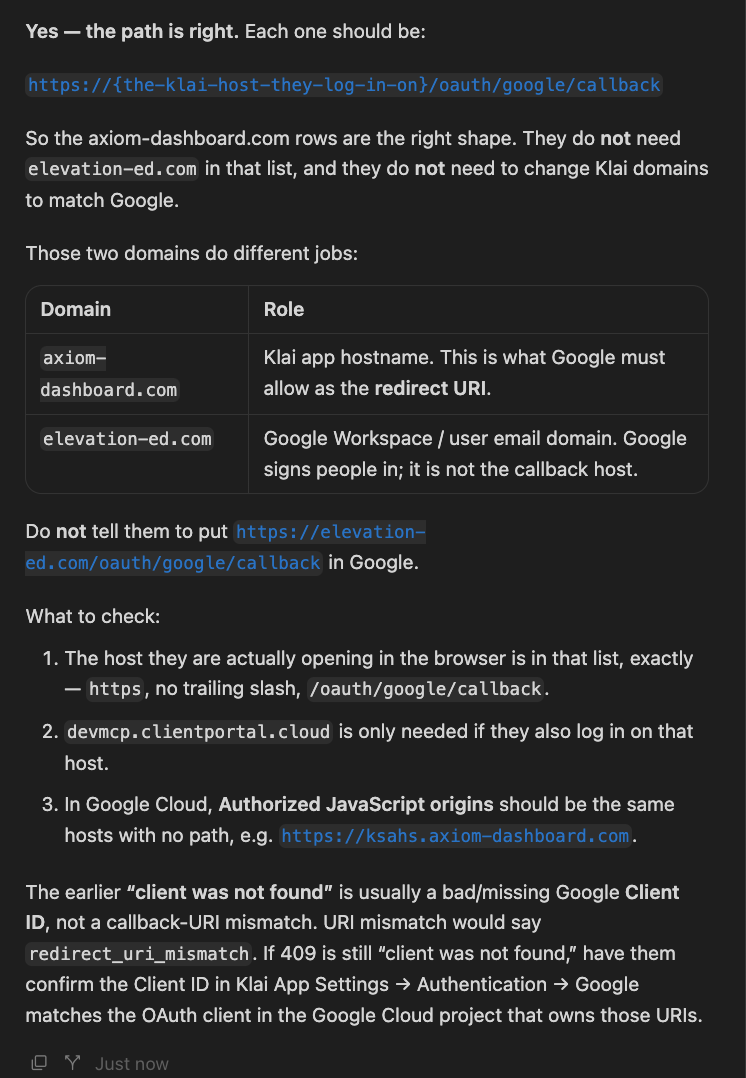
User UBBJX2EHM:
User UBBJX2EHM: why dont you jsut have your ai log into the account and debug
User UBBJX2EHM: that looks same
User U09UK5V4VHB: my slack keeps loading the same image. Let me try to delete the original
User U09UK5V4VHB:
User UBBJX2EHM: See my previosu comment on having agent check
User U09UK5V4VHB: From the Agent:
User U09UK5V4VHB: The 406 is occurring before Google is contacted: BetterForms does not see Google credentials as configured at runtime.
Your active Development environment shows Google enabled, but the saved Client ID is malformed: it begins with `http://`. It must be only the Google client ID, in this format:
```<http://409249217182-k7bgu2hdm7iij6228bt6aglnqd1f49ve.apps.googleusercontent.com|409249217182-k7bgu2hdm7iij6228bt6aglnqd1f49ve.apps.googleusercontent.com>```
In App → Environments → Development → Authentication:
1. Re-selectGoogleas the provider.
2. Replace the Client ID with the value above—no `http://` or `https://`.
3. Re-enter the Client Secret (BetterForms requires reinserting it whenever credentials change).
4. Save, then make a small page save or wait for the environment config/cache to refresh before retrying`/oauth/google`.
Also verify you are testing `dev.clientportal.cloud`, not another environment/domain; the other environments shown do not all have OAuth enabled. Google requires no subdomain value. <https://docs.fmbetterforms.com/reference/users-and-authentication/oauth|FM BetterForms OAuth setup>
User UBBJX2EHM: If you check in our docs, it also mentions that you should not have a https in the domain settings
User U09UK5V4VHB: I didn't have it. I just recopied the id that I had in my notepad.
User U09UK5V4VHB: I think it is working now.
User UBBJX2EHM: Uh huh.
User U09UK5V4VHB: Yes. It is working, although we go through an unfinished page. I will ask the AI about that.
User UBBJX2EHM: You need a callback page.
User U09UK5V4VHB: We have a unique situation with our schools. They have two email accounts, a google and a microsoft account. All of our logins in FMP have been outlook so far. Now that we can do SSO, how do we adjust the helper file so that if they use SSO it looks at a google email, and if they use the regular login, it looks at the outlook email. They are the same prefix, with @sausd.us and @sausdlearns.net as the two options.
User UBBJX2EHM: Use two records. Connect both to your business file but typical practice for SaaS apps is to have a single login
User U09UK5V4VHB: Yup. I figured one with each email, but both with the same FMBId. They won't ever sign in with two different ones. They will probably just use SSO.
User U09UK5V4VHB: Can they be logged in on several devices? iPad, laptop, iPhone?
User UBBJX2EHM: Yes can be on multiple devices